Short answer: Low-code doesn’t mean easy when building real business software—while tools like Power Apps make simple screens quick to assemble, hard architectural problems do not disappear. Data modeling, delegation limits, flow structure, security roles, and clear scope still decide whether a Power Apps project succeeds, and getting them right still takes real experience.
“Low-code” ranks among the most misunderstood buzzwords in the Microsoft ecosystem. Microsoft puts it everywhere—across Power Apps landing pages, Power Automate documentation, and every Power Platform keynote. Consequently, the implied message sounds irresistible: you no longer need a developer to build business software, because anyone can drag and drop an app together.
That promise is partly true. However, it also explains why so many half-built apps sit abandoned inside company environments—leaving frustrated business owners wondering what went wrong.
To be clear, this is not an argument against Power Apps. We build on the Power Platform every single day, and it remains one of the best toolsets available for small and mid-sized business workflows. Still, “low-code” deserves an honest explanation because what it actually delivers differs sharply from what most buyers assume.
What “Low-Code” Actually Means
In practical terms, low-code means Microsoft has already built the underlying plumbing for you: the visual screen engine, native data connectors, authentication framework, and cross-device mobile support. Instead of coding those layers from scratch, you configure them visually.
However, low-code doesn’t mean easy in the sense of eliminating skill, architectural planning, data literacy, or platform experience. Rather, it simply raises the starting floor—letting you assemble a working prototype far faster than traditional custom coding.
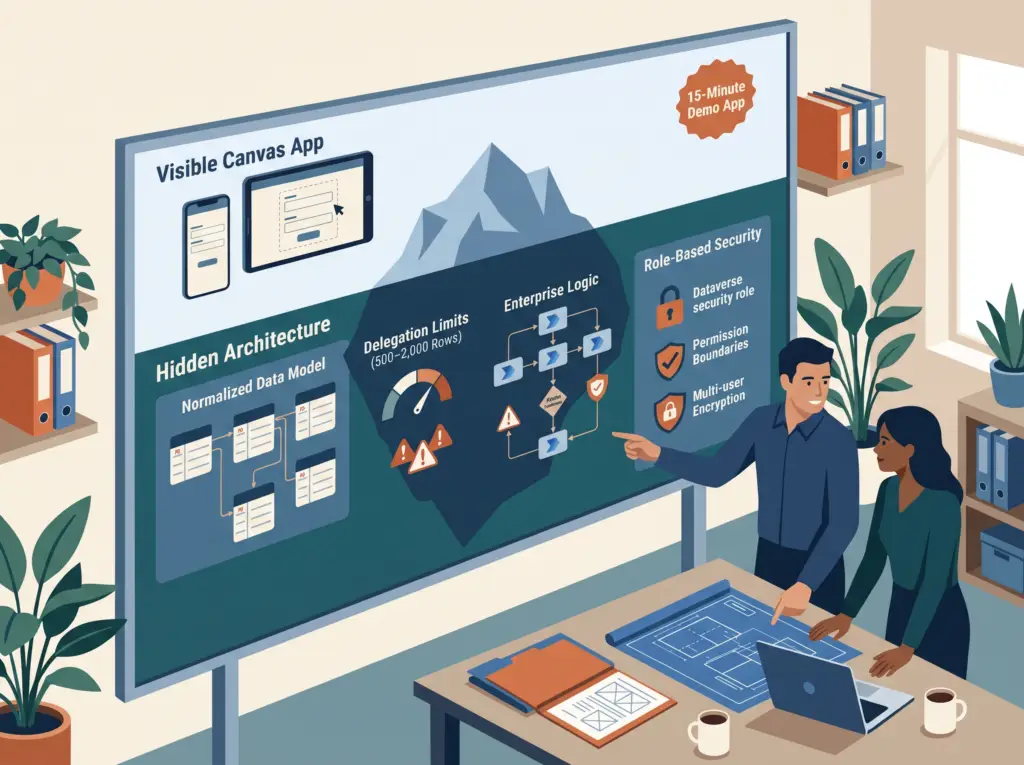
Meanwhile, the ceiling of business complexity has not moved an inch. A multi-step operational workflow remains complex. A poorly structured data model still breaks under real usage. And security rules that fail to mirror how your team operates still expose sensitive records. In short, low-code makes easy tasks faster, yet it never makes hard engineering problems vanish.
The Gap Between a Demo and a Real App
Every Power Apps demo looks effortless. In fifteen minutes, someone builds a form, connects it to a SharePoint list, adds a gallery, and shows data flowing in real time. It looks like anyone could do it.
What the demo doesn’t show:
- The data model. Every entity, relationship, field, data type and business rule worked out before any screen is designed.
- The delegation decision. Whether SharePoint can handle the data volume or Dataverse is required, and what that means for licensing and setup.
- User roles. Who can see which records, who can edit which fields, and how that’s enforced in the data, not just hidden on screen.
- Error handling. What happens when a save fails, a flow errors out or an integration is down, and how users get a clear message instead of a cryptic error.
- Change management. How to get your team to use the new app instead of drifting back to the spreadsheet they’re comfortable with.
None of these are solved by drag-and-drop. All of them take experience, judgment and often several rounds of iteration.
5 Ways “Low-Code” Gets People Into Trouble
1. A Bad Data Model
The most common failure we see in self-built Power Apps is a poor data model. Someone jumps straight into screens without thinking through the data. Everything goes in one table when it needs three. Text fields stand in for proper lookups. Calculated values get stored instead of calculated. The app works with ten records and breaks at a thousand.
In traditional development, someone reviews the data model before any code is written. Low-code makes it easy to skip that step, and the cost shows up later, when fixing the model means rebuilding half the app.
2. The Delegation Trap
Delegation is one of the most important technical concepts in Power Apps. A self-builder who doesn’t understand it builds on SharePoint lists, tests with fifty records, and ships it. Six months later the list has three thousand records, and the app is silently returning wrong results, because it only processes the first 500 to 2,000 records when a search can’t be delegated. Microsoft explains the mechanics in its delegation overview.
This isn’t hypothetical. It’s one of the most common problems we’re called in to fix. For the full picture, see SharePoint Lists vs Dataverse.
3. Messy Flow Architecture
Power Automate flows built without a plan quickly become unmaintainable. Flows with no error handling fail silently. Flows outside of solutions can’t be moved between environments. Flows with hard-coded values break when anything changes. One massive flow instead of smaller pieces becomes impossible to debug. Low-code doesn’t prevent these problems; experience does. See Top 10 Power Automate Tricks for the fixes.
4. Security as an Afterthought
Dataverse security roles are powerful, flexible and genuinely complex. Self-builders often end up with one of two problems: everyone can see and edit everything, or security is so tight people can’t do their jobs. Getting it right means understanding how business units, security roles and record ownership work together, concepts that take time to learn and are easy to get wrong.
5. “I’ll Figure It Out as I Go”
Low-code makes it easy to start building before you know what you’re building. That accessibility is both the strength and the trap. In traditional development, the cost of writing code forces planning. In low-code, the ease of dragging a control onto a screen tempts people to start before the requirements are clear.
Apps built this way pile up problems fast: screens added without a clear navigation plan, data stored in several places, duplicate flows. The result works, barely, and nobody wants to touch it because changing anything might break something else.
Where Low-Code Genuinely Shines
To be clear, Power Apps’ low-code approach is a real advantage in the right situations:
- Simple, well-defined apps with clear data needs are fast and inexpensive to build. A single-table form with a notification and a gallery really is quick when requirements are clear.
- Iteration is fast. Once an app is built correctly, adding a field, changing a screen or adjusting a flow takes hours, not days.
- Business users can contribute. A power user who knows the platform can make meaningful changes without a developer, a real advantage for small businesses.
- Lower total cost for the right use case, not because it’s easy, but because the infrastructure is shared across millions of Microsoft customers and features build faster once you know the platform.
For the fuller argument, see The Case for Power Apps.
What to Ask When Hiring a Power Apps Consultant
“Low-code” in a sales pitch shouldn’t lower your expectations for technical rigor. Ask:
- How do you approach data modeling before building? If they just start building, that’s a red flag.
- How do you handle delegation? Can they explain when SharePoint works and when Dataverse is needed? If not, they haven’t built at scale.
- How do you structure flows? Do they use solutions, environment variables and modular flows?
- How do you handle security? Can they explain Dataverse security roles and how they’d set them up for your team?
- What does testing look like? It should include realistic data volumes and every user role.
For what a well-scoped project costs, see How Much Does a Power Apps Project Cost?
If You’re Building It Yourself
If you’re a business owner or internal IT person building Power Apps for your own organization, low-code gives you a real path, with some caveats:
- Learn data modeling before you touch the canvas. The biggest decisions happen before the first screen. Know your entities, relationships and data volumes before choosing a data source.
- Learn delegation before committing to SharePoint. If your data could exceed a few thousand records, understand the limits first.
- Build inside solutions from day one. Solutions organize, version and move apps between environments. Building outside one is fine for experiments but becomes a maintenance problem in production.
- Plan security before configuring Dataverse. Map out roles, what each can see and what each can do.
- Get help for what you don’t know. Even if you’ll build it yourself, a scoping session or architecture review with someone experienced almost always pays for itself.
New to the platform? Start with Power Apps 101.
The Bottom Line
Low-code is a real, meaningful advance. It has opened up app development to small businesses that could never justify traditional software costs.
But it isn’t a magic wand. Business problems are still complex. Data is still messy. Users still have varied needs and edge cases. Low-code makes the build faster and more accessible; it doesn’t make the thinking easier.
The most successful Power Apps projects we’ve seen, the ones that get adopted, handle real data volumes and hold up over time, all have one thing in common: someone took the time to think carefully before building.
That thinking is the real work. The drag-and-drop is the easy part. If you’d like that thinking done right, see our Power Apps and Power Platform development service.
Started a Power App that’s gotten out of hand? Book a free diagnostic and we’ll review the data model, delegation and security with you.
Frequently Asked Questions
Is Power Apps easy to learn?
Simple apps are easy to build, especially if you know Excel formulas. Complex apps with related data, large datasets, security roles and integrations take real platform experience.
Why do Power Apps projects fail?
The most common causes are a poor data model, ignoring delegation limits on SharePoint, flows with no error handling or structure, security set up as an afterthought, and starting to build before requirements are clear.
Do I need a developer to build a Power App?
Not for simple apps. For apps with complex data, integrations, sensitive data or many users, an experienced Power Apps developer usually saves time and prevents costly rebuilds.
What does low-code actually mean?
Low-code means the underlying infrastructure (screens, data connections, security and mobile support) is already built, so you configure apps visually instead of writing code from scratch. Planning and design still matter.
Anthony Passeri, MBA, is the founder of Access Evolved and a certified Microsoft Access Expert with 21+ years of Access and relational database experience. He helps businesses keep critical Access databases running and modernize them to Power Platform or SQL Server. More about Anthony
Talk to an Access Expert
Not sure what this means for your database? Book a free diagnostic call. No sales pitch, just a straight conversation about what makes sense for your situation.
Phone: 623-267-5720
Email: info@accessevolved.com
Access Evolved | 19580 W Indian School Rd, Ste 105 #815, Buckeye, AZ 85396
Sources